How to refresh a report in Excel
Last updated: February 9, 2026
There are three ways to refresh your imported data in LiveFlow:
Method 1 - Enable Automatic Refresh (Recommended)
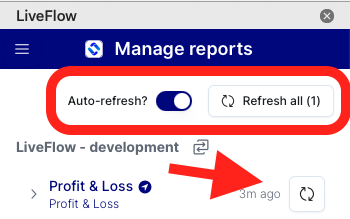
Go to Manage Reports by clicking the menu button (3 Lines) in the top-left corner of your LiveFlow window
Click the “Auto-Refresh Toggle”
This setting ensures that all reports refresh automatically every time the document is opened.
Method 2 - Manually Refresh All Reports
Open LiveFlow
Go to Manage Reports
Click "Refresh all reports" to manually update all of your reports at once
Method 3 - Manually Refresh Individual Reports
Open Manage Reports
Locate the specific report you want to update
Click on "Refresh all reports" to manually update the specific report