How to generate a unique list of vendors in LiveFlow
Last updated: February 9, 2026
To Generate a unique list of your vendors, sorted alphabetically
Open the LiveFlow Extension and generate the Expenses by Vendor Report
Choose your Destination for the alphabetical list of vendors
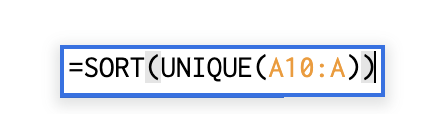
Type the formula:
=SORT(UNIQUE(A10:A))Make sure you don't indicate a specific cell for the end of the range. Instead include only the column for the end of the range, in case accounts get added in the future